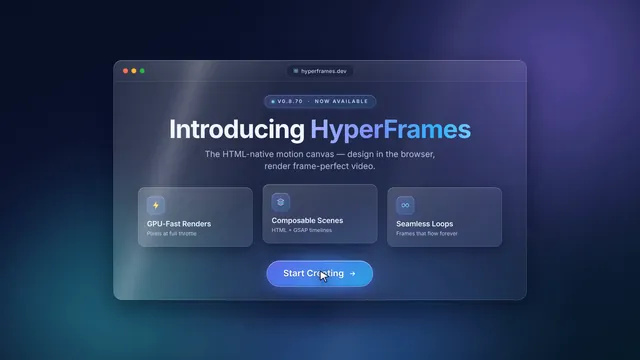
Glass launch UI
Create a looping launch-announcement UI animation with HyperFrames, about 12 seconds long at 1920x1080 and 30 fps, that loops seamlessly (the last frame flow…
More
1 test · 1 finished runs (1 agent, 0 raw one-shot) · 1 video
The prompt
Create a looping launch-announcement UI animation with HyperFrames, about 12 seconds long at 1920x1080 and 30 fps, that loops seamlessly (the last frame flows back into the first). Style: glassmorphism, with frosted translucent glass panels over blurred backgrounds, soft inner highlights, thin light borders and subtle shadows, floating above a slowly moving gradient of deep blue, violet and teal light. Sequence: a glass app window slides in and settles; the headline "Introducing HyperFrames" fades in from a soft blur; three glass feature cards stagger in, each with a small icon and a short label; a glowing call-to-action button pulses; a cursor glides in, hovers and clicks it, sending a ripple through the glass; then the panels drift apart and dissolve back into the opening layout. Use smooth easing, parallax depth between layers and light reflections sweeping across the glass. Keep the text crisp and readable and all motion deterministic (no random values at render time). HyperFrames 0.8.70 is already installed for you in the current directory: node_modules is pre-installed and read-only, so do not run npm install or npx --yes; use the local hyperframes command (for example hyperframes init <dir> --example blank, then hyperframes render). Render the final video yourself to out.mp4 in the current directory. You may take snapshots and inspect your own output (headless chromium is available at /usr/bin/chromium) and iterate on your own before finishing.
Same prompt, all models: step through 4 runsIn the gallery: one player, arrow keys or swipe.