Isometric server room
[Task] Create a 26-second, 1920x1080, 30 fps isometric motion-graphics video of a data hall coming online, suffering a rack failure and failing over to a sta…
More
1 test · 2 finished runs (2 agent, 0 raw one-shot) · 2 videos
The prompt
[Task] Create a 26-second, 1920x1080, 30 fps isometric motion-graphics video of a data hall coming online, suffering a rack failure and failing over to a standby rack, all tracked by a live wall status board. [Scenes] 1. 0-4 s: An empty isometric floor grid draws itself tile by tile from the centre outward. Four rows of racks (A-D, four per row) extrude upward with a staggered spring. Overhead cable trays draw in as glowing lines. The camera drifts slowly along the diagonal. 2. 4-9 s: Power on. LEDs cascade down each rack front in a wave, and fan grilles spin. Packets (small glowing capsules) begin streaming along the trays between the racks and a core switch. The wall status board flickers on and shows OPERATIONAL. 3. 9-14 s: Traffic peaks. The packet density rises with the throughput figure. The camera tracks a single packet along a cable, zooming into rack B3 as its LEDs blink. 4. 14-18 s: Failure. B3's LEDs stutter and turn red, and seeded smoke wisps rise from its vent. A red alarm ring pulses across the floor. Packets heading for B3 stall and bunch up on the cable. The board flips to DEGRADED with a shake and a red header. 5. 18-22 s: Failover. The core switch flashes and cable routes re-light, first amber, then green, toward standby rack D4. D4's lid lifts slightly and its LEDs spin up. Queued packets release in a burst along the new route. 6. 22-26 s: Recovery. The board returns to OPERATIONAL and the latency sparkline settles. The camera cranes up to a near top-down overview as "Halvard DC-3 · Failover drill complete" assembles letter by letter. [Style] Palette: #0E1420 deep slate, #1F2B3D rack grey-blue, #3DF5C8 healthy teal, #FFB020 warning amber, #FF4D5E fault red, #E6EDF7 label white. Monospaced UI type on the board and condensed sans for labels. Flat isometric faces with three-tone shading, emissive LED bloom and a faint floor reflection. Motion is mechanical: linear packet travel, snappy back-out springs on extrusion and a 40 ms LED stagger. [Data] The status board changes by phase (throughput / p95 latency / active nodes / uptime): Boot: 0.0 Gb/s / -- / 0 of 15 / 0.000% Running: 38.6 Gb/s / 12 ms / 15 of 15 / 99.998% Peak: 71.2 Gb/s / 18 ms / 15 of 15 / 99.998% Fault: 52.4 Gb/s / 214 ms / 14 of 15 / 99.981% Failover: 66.0 Gb/s / 31 ms / 15 of 16 / 99.981% Recovered: 69.8 Gb/s / 14 ms / 15 of 16 / 99.983% Event log lines: 14:02:11 B3 thermal fault; 14:02:12 reroute via CORE-1; 14:02:15 D4 standby online. [Wow] - True isometric depth sorting, with packets passing correctly behind and in front of racks. - Packets follow the actual cable paths and queue physically at the fault. - Emissive light: red and green LED glow spills onto the floor and neighbouring rack faces. - The event log types onto the board in sync with the on-floor action. - A continuous camera with no cuts: drift, track, crane. [Rules] - Every frame is drawn in code (SVG, canvas, CSS or WebGL). No image files, no image generation, no external assets beyond fonts. - Deterministic: no unseeded randomness at render time. - Text must be crisp, spelled correctly and readable at 1080p. - No hard cuts between scenes: every change is a designed transition. - Isometric projection must stay consistent (one fixed 2:1 axis) throughout. [Harness notes] Render the final video to out.mp4 (1920x1080, 26 s). Write everything into the working directory. HyperFrames 0.8.70 is already installed for you in the current directory: node_modules is pre-installed and read-only, so do not run npm install or npx --yes; use the local hyperframes command (for example hyperframes init <dir> --example blank, then hyperframes render). Render the final video yourself to out.mp4 in the current directory. You may take snapshots and inspect your own output (headless chromium is available at /usr/bin/chromium) and iterate on your own before finishing.
Same prompt, all models: step through 2 runsIn the gallery: one player, arrow keys or swipe.
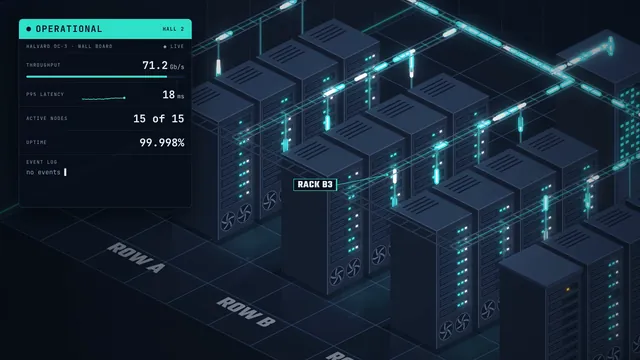 Rendered video
Claude Opus 5.5
Claude Code 2.1.280
skills on · Claude Code 2.1.280 + Remotion/HyperFrames skills
Rendered video from the run
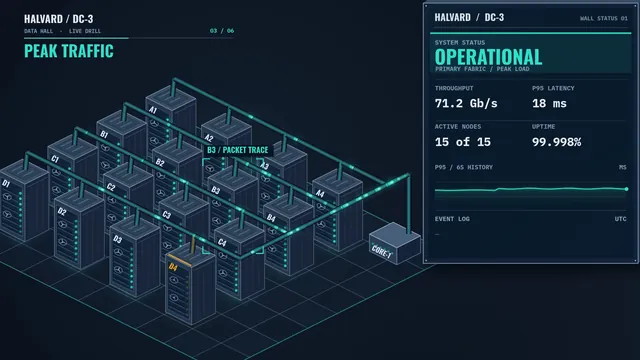 Rendered video
GPT-6 Sol
Codex CLI 0.156.1
skills on · Codex CLI 0.156.1 + Remotion/HyperFrames skills
Rendered video from the run