Satellite constellation
[Task] Create a 24-second cinematic motion-graphics video, 1920x1080 at 30 fps, showing a fictional satellite constellation called HALCYON-6 deploying around…
More
1 test · 2 finished runs (2 agent, 0 raw one-shot) · 2 videos
The prompt
[Task] Create a 24-second cinematic motion-graphics video, 1920x1080 at 30 fps, showing a fictional satellite constellation called HALCYON-6 deploying around Earth plane by plane until global coverage locks in. [Scenes] 1. 0-4 s: Black space with faint stars. A night-side Earth rotates slowly into frame, with city-light dots, a glowing atmosphere rim and a sharp day-night terminator. The title HALCYON-6 assembles letter by letter, then slides into a top-left HUD. 2. 4-9 s: Plane 1 draws itself as a thin luminous ellipse, tilted 53 degrees. Eight satellites pop onto it in a staggered sequence and begin orbiting. Each satellite projects a soft circular footprint onto the surface. Plane 2 follows at a 60-degree offset. The coverage counter in the bottom-right counts up to 31%. 3. 9-15 s: The camera orbits 40 degrees around Earth. Planes 3, 4 and 5 deploy in quick succession. Their footprints overlap, and where two overlap the colour brightens additively. The counter climbs to 82%. 4. 15-20 s: Plane 6 completes the shell. The camera pulls back to show all 48 satellites. Thin cyan inter-satellite laser links flicker on between neighbours, forming a moving mesh. 5. 20-24 s: The remaining dark gaps on the globe fill in. The counter lands on 97.4% with a gentle overshoot and settle. The rings fade to a single pulse, and the end card reads COVERAGE ACHIEVED. [Style] Palette: #05070F space, #0E2A47 ocean, #F2B544 city lights, #3EE6FF orbits and links, #FF5E7A footprint highlights, #E8EEF5 type. Use a clean monospaced HUD font for the numbers and a wide geometric sans for the titles. Add soft bloom on the orbits, subtle film grain and a rim light from an off-screen sun at the right. Motion is calm and orbital: ease-in-out cubic camera moves, spring overshoot on counters and stagger on satellite spawns. [Data] Constellation: 6 planes, 8 satellites per plane, altitude 1,150 km, inclination 53 degrees. Coverage after each plane: 1: 14%, 2: 31%, 3: 49%, 4: 66%, 5: 82%, 6: 97.4%. HUD labels: PLANE n/6, SATS n/48, ALT 1,150 km. [Wow] - A true 3D orbital camera move with depth: satellites behind Earth are occluded, and the rings pass correctly in front of and behind the globe. - Footprints are projected onto the sphere's curvature, not drawn as flat circles. - Laser links shimmer along their length with travelling light packets. - The HUD has a parallax layer: grid lines and readouts drift slightly opposite to the camera move. - The counter digits roll like an odometer rather than swapping. [Rules] - Every frame is drawn in code (SVG, canvas, CSS or WebGL). No image files, no image generation, no external assets beyond fonts. - Deterministic: no unseeded randomness at render time. - Text must be crisp, spelled correctly and readable at 1080p. - No hard cuts between scenes: every change is a designed transition. - The coverage counter must match the dataset value at the moment each plane completes. [Harness notes] Render the final video to out.mp4 (1920x1080, 24 s). Write everything into the working directory. Remotion 4.0.527 is already installed for you in the current directory: node_modules is pre-installed and read-only, so do not run npm install or create-video, and a remotion.config.ts here already points rendering at the local Chromium. Render the final video yourself to out.mp4 in the current directory (for example npx remotion render <entry file> <composition id> out.mp4). You may render stills or frames and inspect your own output (headless chromium is available at /usr/bin/chromium) and iterate on your own before finishing.
Same prompt, all models: step through 2 runsIn the gallery: one player, arrow keys or swipe.
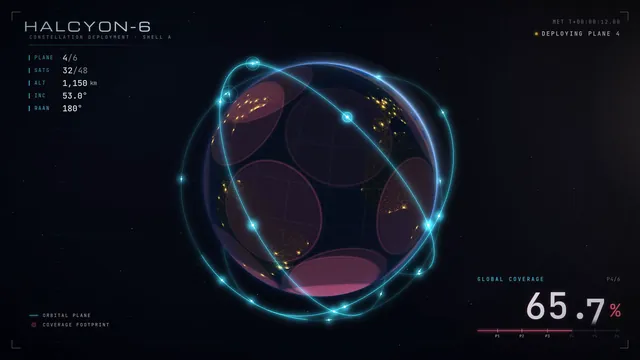 Rendered video
Claude Opus 5.5
Claude Code 2.1.280
skills on · Claude Code 2.1.280 + Remotion/HyperFrames skills
Rendered video from the run
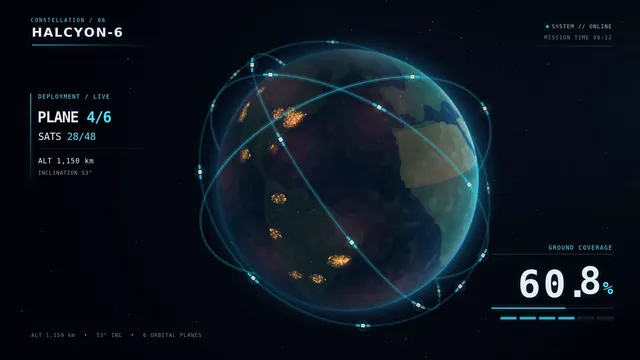 Rendered video
GPT-6 Sol
Codex CLI 0.156.1
skills on · Codex CLI 0.156.1 + Remotion/HyperFrames skills
Rendered video from the run