Toy pool water
Build "Plush Lagoon", a miniature toy-spa water toy in Three.js.
More
1 test · 1 finished runs (1 agent, 0 raw one-shot) · 1 live demo
The prompt
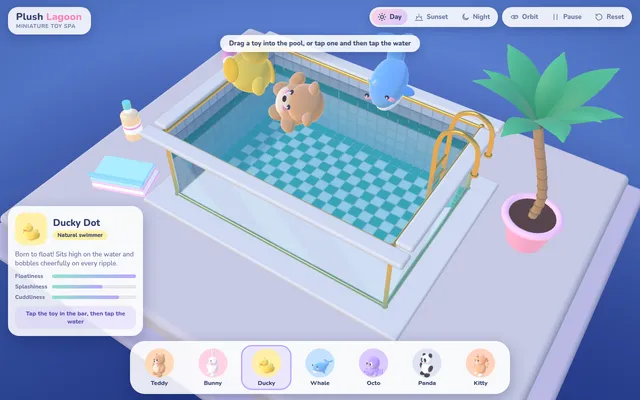
Build "Plush Lagoon", a miniature toy-spa water toy in Three.js. The scene is a small rectangular swimming pool on a pale plinth, seen from a three-quarter view against a soft deep-blue backdrop: glass side walls with thin brass edges so you can see the water from the side, a white coping rim, a tiled pool floor in teal and white, a ladder with brass rails on one side, a potted palm tree beside it and a few small props on the plinth (a folded towel, a bottle). The water is the star: an interactive height-field surface simulated on the GPU (render-target ping-pong or an equivalent) with real-time ripples that spread, reflect off the walls and fade; the surface refracts the tiles below and reflects the environment with a Fresnel term; animated caustics play across the pool floor and walls, driven by the simulated surface; the water volume reads through the glass walls with depth-based tint. Along the bottom, a pastel picker bar offers at least seven cute plush toys built in code from simple shapes (teddy bear, bunny, duck, whale, octopus, panda, cat), each with its own soft colour and name label. The user drags a toy from the bar or taps one and taps the water to drop it in: it splashes, makes rings, then floats and bobs with simple buoyancy (several sample points, sinking and resurfacing, tilting with the waves) and drifts and bumps gently against the walls and the other toys. Holding on a floating toy dips it under; tapping the water makes ripples. Add a small info card for the selected toy, an orbit/pause control and a mood selector that changes the lighting and water colour (for example deep blue night and sunny day). The UI should be soft, rounded and pastel, with clean typography. Everything is built in code; no external models, textures or HDRIs. Build it as index.html (plus any local asset files you create) in the current directory, with no build step; three.js and any addons may load from a pinned CDN. It must hold at least 30 fps on a mid-range phone, with touch, drag and tap all working, and stay smooth on a laptop. You may serve it locally and open it in headless chromium (/usr/bin/chromium, software WebGL, no GPU) to screenshot and inspect your own output, and iterate on your own before finishing. Close any browser you open as soon as you've taken your screenshot. Finish with a short README.md describing the controls.
Same prompt, all models: step through 1 runsIn the gallery: one player, arrow keys or swipe.