Video style morph character hyperframes
[Task] Create a 15-second looping motion-graphics video of one consistent character who morphs through eight art styles.
More
1 test · 1 finished runs (1 agent, 0 raw one-shot) · 1 video
The prompt
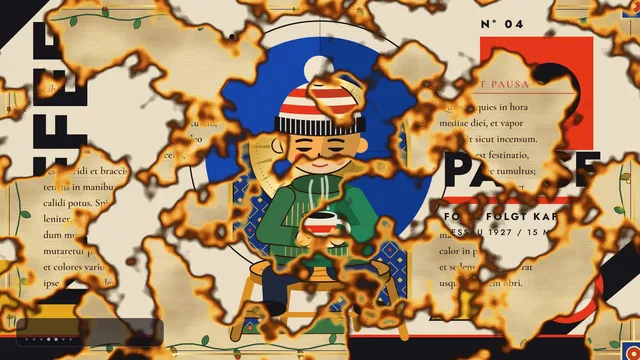
[Task] Create a 15-second looping motion-graphics video of one consistent character who morphs through eight art styles. [Subject] One original character: a small, round-headed person with a calm, slightly sleepy expression, a striped knit beanie with a pom-pom, a green sweater and dark trousers, sitting on a wooden stool and holding a mug of coffee. Across the video they sit, breathe and slowly take a sip; the pose, proportions, outfit and the mug stay the same in every style so the viewer always reads it as the same character. [Styles, in order, each about 1.8 s] 1. Ukiyo-e woodblock print: a great curling wave, a distant snowy mountain, a red sun disc, flat inks and paper grain. 2. Claymation: soft rounded clay forms, fingerprint texture, slight stop-motion jitter. 3. Stained glass: bold lead lines, jewel-coloured glass panes, light glowing through. 4. Bauhaus poster: primary colours, circles, squares and diagonals, bold geometric type. 5. Illuminated manuscript: parchment, gold leaf, an ornate initial letter and border vines. 6. 1-bit classic Mac paint: black and white pixels, dither patterns, a tiny window frame. 7. Pencil line drawing: graphite sketch lines on white paper, hatching, construction lines. 8. Back to the ukiyo-e scene, so the video loops. [Rules] - Every frame is drawn in code (SVG, canvas, CSS or WebGL). No image files, no image generation, no external assets beyond fonts. - Each change of style is a real transition (a wipe, morph, dissolve, paper tear, pixelation or ink spread), never a hard cut, and the character stays in place through it. - Show a small, tasteful label naming each style as it appears. - The last frame matches the first so the video loops seamlessly. [Harness notes] Render the final video to out.mp4 (1920x1080, 15 s). Write everything into the working directory. HyperFrames 0.8.70 is already installed for you in the current directory: node_modules is pre-installed and read-only, so do not run npm install or npx --yes; use the local hyperframes command (for example hyperframes init <dir> --example blank, then hyperframes render). Render the final video yourself to out.mp4 in the current directory. You may take snapshots and inspect your own output (headless chromium is available at /usr/bin/chromium) and iterate on your own before finishing.
Same prompt, all models: step through 1 runsIn the gallery: one player, arrow keys or swipe.