Gemini 3.6 Flash · Free lane
- 3 finished runs
- 11 prompts
- 1 model
- every prompt published
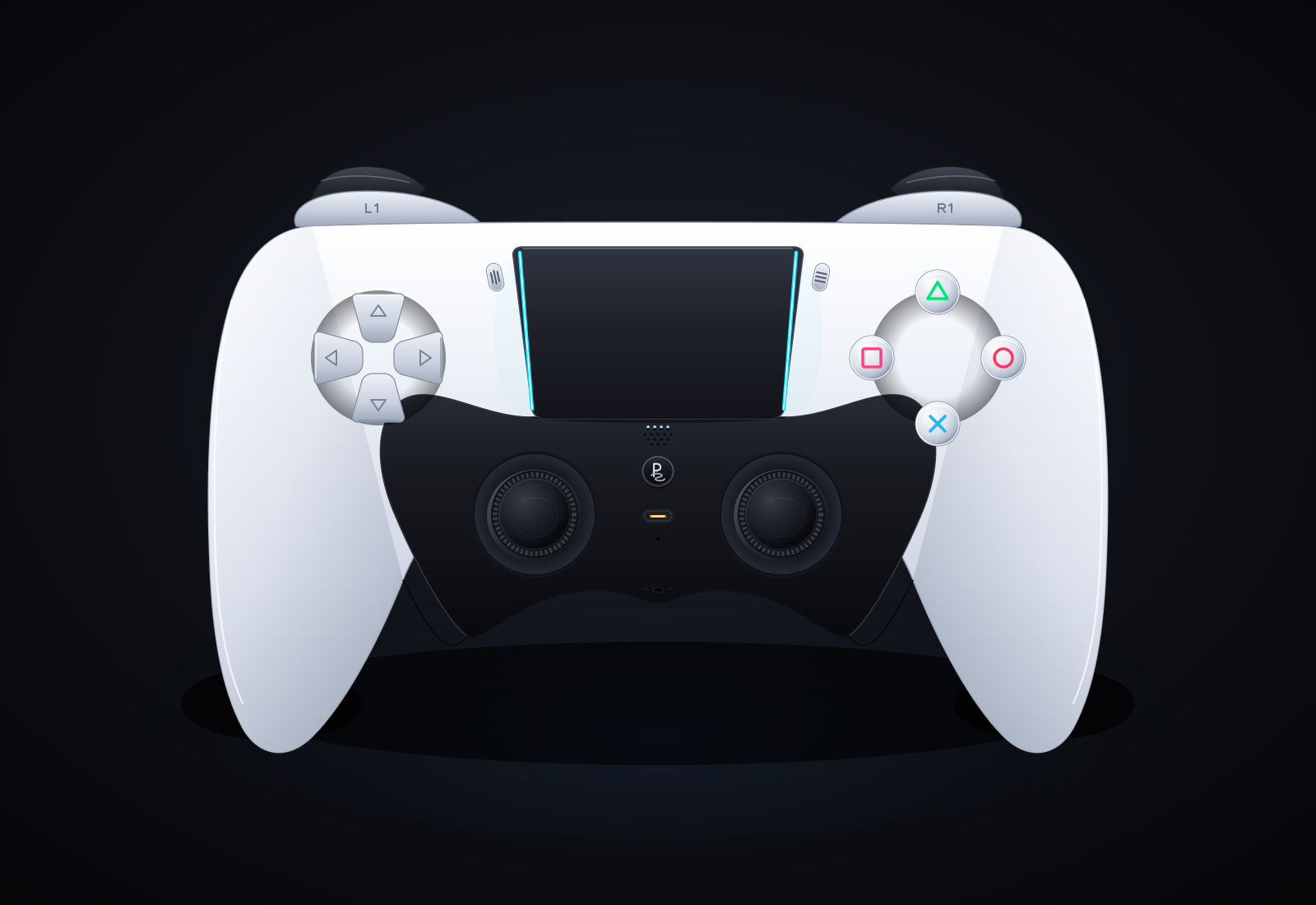
PS5 Pro DualSense controller (max-fidelity SVG)
Create a single self-contained SVG illustration of the Sony PS5 Pro DualSense wireless controller at MAXIMUM fidelity. This is a showcase piece: take your time to plan the geometry carefully before writing it. Requirements: 1) Accurate DualSense silhouette and proportions: a wide body with the large, wide touchpad spanning the top centre, two flared, rounded grips sweeping down and outward, and a perfectly symmetrical left/right layout. White outer shell with the black central core section. 2) Face buttons on the right in the classic diamond: triangle (top), circle (right), cross (bottom), square (left), each drawn as clean PlayStation symbols in their real colours (green triangle, red circle, blue cross, pink square) in the modern outline style on light buttons, with subtle bevels. 3) D-pad on the left as FOUR separate arrow-shaped directional buttons (up, down, left, right), not a single cross. 4) Two black analog sticks with concave tops and a textured grip ring (fine radial or dotted texture) and shading. 5) The PlayStation logo button centred below the touchpad between the sticks, the small mic mute button with its orange-tinted indicator line just below it, the Create button (left) and Options button (right) flanking the touchpad. 6) The blue light-bar glow running along both side edges of the touchpad, with a soft bloom. Speaker grille holes on the black core. 7) Realistic product-render shading: gradients, specular highlights, soft ambient occlusion, a contact shadow beneath the controller. 8) A clean dark studio background with a subtle radial vignette. Front-on hero shot, centred and filling the frame well. Use viewBox="0 0 1600 1100" with width="1600" height="1100". No external assets, no raster images, no fonts, no scripts. Output ONLY the complete SVG code, starting with <svg and ending with </svg>, with no explanation or markdown fences. Save it as controller.svg in the current directory. You may render and inspect your own output (headless chromium is available at /usr/bin/chromium) and iterate on your own before finishing.
Pelican riding a bicycle (control)
Generate an SVG of a pelican riding a bicycle. Save it as pelican.svg in the current directory. You may render and inspect your own output (headless chromium is available at /usr/bin/chromium) and iterate on your own before finishing.
MacBook Pro 16" realistic 3D render (Playcode benchmark)
Generate an SVG that looks like a realistic 3D render of a MacBook Pro 16" (opened, slight three-quarter view, screen glow, aluminum body). Use gradients and perspective to fake the 3D. Save it as macbook.svg in the current directory. You may render and inspect your own output (headless chromium is available at /usr/bin/chromium) and iterate on your own before finishing.
Lighthouse on a headland at night
Create an SVG of a lighthouse on a rocky headland at night: stormy sea, the lighthouse beam cutting through rain and mist, moonlight on the waves, as atmospheric and painterly as you can. Save it as lighthouse.svg in the current directory. You may render and inspect your own output (headless chromium is available at /usr/bin/chromium) and iterate on your own before finishing.
Isometric SVG town with sprite sheet
Create an isometric SVG town: first design a small sprite sheet of distinct buildings (in <defs>), then place 20+ of them on an isometric grid with roads, trees, a river and a bridge. Pick your own theme and palette. Save it as town.svg in the current directory. You may render and inspect your own output (headless chromium is available at /usr/bin/chromium) and iterate on your own before finishing.
Animated pelican riding a bicycle (SMIL/CSS)
Generate an animated SVG of a pelican riding a bicycle: the wheels and pedals turn, the legs pedal in sync, and it loops seamlessly. Use only SVG/SMIL or CSS inside the SVG, no JavaScript. Save it as pelican_animated.svg in the current directory. You may render and inspect your own output (headless chromium is available at /usr/bin/chromium) and iterate on your own before finishing.
California brown pelican riding a bicycle (detailed spec)
Generate an SVG of a California brown pelican riding a bicycle. The bicycle must have spokes and a correctly shaped bicycle frame. The pelican must have its characteristic large pouch, and there should be a clear indication of feathers. The pelican must be clearly pedaling the bicycle. The image should show the full breeding plumage of the California brown pelican. Save it as brown_pelican.svg in the current directory. You may render and inspect your own output (headless chromium is available at /usr/bin/chromium) and iterate on your own before finishing.
Xbox 360 controller
Create an SVG image of an Xbox 360 controller. Save it as xbox360.svg in the current directory. You may render and inspect your own output (headless chromium is available at /usr/bin/chromium) and iterate on your own before finishing.
BMW M4 Competition, side view (flat vector)
Create a clean SVG illustration of a BMW M4 Competition in a side view. The image must follow a 4:3 aspect ratio. Use the original factory color of the BMW M4 Competition. Focus on coupe proportions and sporty stance. Use vector shapes without gradients. Save it as bmw_m4.svg in the current directory. You may render and inspect your own output (headless chromium is available at /usr/bin/chromium) and iterate on your own before finishing.
Cinematic fjord boat scene (Three.js)
Build a playable, cinematic single-page Three.js experience: a small boat drifting through a Norwegian-style fjord / coastal mountain landscape.

Requirements:
- ONE self-contained index.html file (HTML + CSS + JS inline). No external assets of any kind (no textures, models, fonts, audio files) EXCEPT Three.js itself, loaded via an import map from this exact pinned CDN:
  "three": "https://cdn.jsdelivr.net/npm/three@0.160.0/build/three.module.js",
  "three/addons/": "https://cdn.jsdelivr.net/npm/three@0.160.0/examples/jsm/"
  All textures (water normals, rock, snow, bark, clouds, etc.) must be generated procedurally in code (canvas / DataTexture / shaders).
- Scene content: steep procedural fjord walls and mountains with snow caps, rock and grass coloring by height/slope; procedural conifer forests (instanced); a water surface with animated waves and sky/landscape reflections; a lighthouse on a rocky point with a rotating beam that matters at night; a small wooden boat with 2 simple stylized 3D characters on it (one rowing/steering, one looking around, with small idle animations); distant islands; birds or other small life if cheap.
- Dynamic weather cycling clear -> fog -> rain -> storm -> clearing, with smooth transitions: fog density, cloud cover, rain particles, lightning flashes + wind and bigger waves in the storm.
- A full day/night cycle: sunrise, day, golden hour, sunset, night with stars and moon, lit lighthouse and boat lantern. Sky color, sun/moon lights, and fog color must track time of day.
- Controls: keyboard (WASD/arrows to steer and throttle the boat, C to switch camera, T toggles auto-tour, 1-5 to force weather, N to jump time) and touch (on-screen joystick/buttons on phones). Camera follows the boat in play mode.
- An "auto-tour" cinematic camera mode: slow, smooth, film-like camera moves (orbits, low water-level glides, high establishing shots, close-ups of the characters) while the boat drifts along a path through the fjord and the weather and time of day progress.
- Minimal, elegant UI: small title "Fjordlys" (or a better name of your choice), a tiny hint line for controls, fading out in tour mode.
- Must run smoothly on desktop and phone browsers: keep geometry/particle counts moderate, cap devicePixelRatio at 2, handle resize/orientation.
- IMPORTANT for automated video capture, support these URL parameters:
  ?tour=1        start directly in auto-tour mode
  ?capture=1     hide ALL UI overlays (title, hints, touch controls)
  ?cycle=40      when present, compress one complete showcase into that many seconds: the time of day goes from morning through golden hour, sunset and night, and the weather passes clear -> fog -> rain -> storm -> clearing within that span (so a 40-second recording shows everything). Without it, use a relaxed pace suited to live play.
  Drive all animation from the requestAnimationFrame timestamp / performance.now() (not from wall-clock-independent accumulators that ignore time), so that overriding those functions steps the scene deterministically. Set window.__sceneReady = true once the first frame has rendered.
- No console errors or warnings in a current Chrome. Use modern Three.js r160 APIs only (no deprecated/removed ones).

Output ONLY the complete index.html, starting with <!DOCTYPE html> and ending with </html>, with no explanation and no markdown fences. Build it as index.html (plus any local asset files you create) in the current directory. Three.js may load from a pinned CDN. You may serve it locally and open it in headless chromium (/usr/bin/chromium, software WebGL, no GPU) to screenshot and inspect your own output, and iterate on your own until it looks genuinely cinematic before finishing. Close any browser you open as soon as you've taken your screenshot.
Animated short film drawn in code (HTML/JS)
Write a single self-contained HTML file that plays an original animated short film, about 50 seconds long, drawn entirely in code.

Hard technical rules:
- One file: HTML + inline <script> (+ optional inline <style>). No external images, fonts, libraries, audio files or network requests of any kind. Every frame is drawn procedurally with Canvas 2D (or WebGL if you prefer).
- The canvas renders at a fixed internal resolution of 1920x1080 and is scaled with CSS to fit the window (letterboxed, black background).
- The animation starts automatically on page load and is driven ONLY by requestAnimationFrame and the timestamp from performance.now() (measure elapsed time from the first frame). Everything on screen must be a pure function of elapsed time t, so the film is deterministic and can be captured frame by frame. No Math.random() at draw time — use a seeded PRNG / hash noise so frames are identical run to run. No setTimeout/setInterval for animation.
- Define window.FILM_DURATION (seconds). After the film ends, hold the final frame.
- Soundtrack: write an original WebAudio score (melody, chords, a little percussion or ambience, and sound cues that match story moments) synced to the same timeline. Put ALL audio scheduling in a function window.buildSoundtrack(ctx, startTime) that schedules every note/effect on any BaseAudioContext (so it also works on an OfflineAudioContext). Also expose window.renderSoundtrack = () => an OfflineAudioContext(2, 44100*FILM_DURATION, 44100) render of it returning a Promise<AudioBuffer>. For live viewing, start the soundtrack on the first click/tap/keypress (browsers block autoplay) aligned to the current film time; show a small unobtrusive "tap for sound" hint until then. Use only oscillators, noise buffers you generate, filters, gain envelopes — no samples.
- No console errors.

The film (this is a showcase of what you can animate — make it genuinely beautiful and moving):
- An ORIGINAL story with a small emotional arc (setup, a problem or longing, a turn, a warm resolution). A single consistent main character — any character you like — who appears in every scene and is recognisably the same design throughout.
- At least 4 distinct scenes, with real transitions between them (e.g. wipes, iris, match cuts, cross-dissolves, camera moves through space).
- Expressive character animation: a proper walk cycle (legs, arms, body bob), blinking, and facial emotion changes (e.g. curious, sad, surprised, joyful) that follow the story.
- A virtual camera that pans, zooms and tracks, with parallax layers for depth.
- Lighting and time-of-day changes across the film (e.g. dawn → day → dusk → night, or a storm clearing), with colour grading, glows, and shadows.
- Particles and weather (rain, snow, fireflies, leaves, dust, stars — your choice, at least two kinds).
- On-screen story text / subtitles in a tasteful storybook style that tell the story in a few short lines.
- A cohesive art direction: a warm, hand-made "paper cut-out / storybook" look is welcome (textured paper, soft edges, slight wobble), but choose what serves your story.
- End with a title of your film and a gentle closing frame.

Output ONLY the complete HTML file, starting with <!DOCTYPE html> and ending with </html>. No explanation, no markdown fences. Save it as index.html in the current directory. You may open it in headless chromium to check it and iterate.