F1 lap telemetry
[Task] Create a 30-second telemetry visualisation, 1920x1080 at 30 fps, of one qualifying lap by car #27 (driver R.
More
1 test · 2 finished runs (2 agent, 0 raw one-shot) · 2 videos
The prompt
[Task] Create a 30-second telemetry visualisation, 1920x1080 at 30 fps, of one qualifying lap by car #27 (driver R. Lindqvist, team Halvard Racing) at the fictional Valtero Park circuit. A track map and live traces run in sync, ending in a delta reveal. [Scenes] 1. 0-3 s: Darkness. A racing line draws the circuit outline in one stroke, and corner labels T1-T8 pop in. The title "Q3 // Valtero Park" slides in, and three empty trace lanes (Speed, Throttle, Brake) unfold beneath. 2. 3-11 s: Sector 1. The car dot launches, leaving a speed-coloured trail. All three traces draw left to right in lockstep with the dot. A digital speedometer counts live. At T1 the brake lane spikes red and the camera punches in on the corner. 3. 11-19 s: Sector 2. The camera drifts across the map. The trace view auto-scrolls, and the T3 and T5 hairpin minima get annotated callouts. The sector time locks in with a purple flash, marking a personal best. 4. 19-26 s: Sector 3. The car flows through T7 and T8, and the trail completes the loop. The S3 time locks in. 5. 26-30 s: The map zooms out. The three sector tiles assemble into a lap time of 1:20.453, a ghost trace of the previous pole overlays the data, and the delta counts to -0.158 in green. Final text: "Provisional Pole". [Style] Palette: #07090D (carbon black), #E10600 (brake red), #00E676 (throttle green), #B388FF (purple best), #F5F7FA (white). Type is a condensed technical sans with tabular figures. Lighting uses glowing strokes, faint carbon-weave texture and scanline sheen. Motion is snappy, with quick ease-out expo, tight springs on tiles and a hard-edged 4-frame stagger. [Data] Samples every 200 m (lap 4,800 m), listed as distance m: speed km/h / throttle % / brake %. 0:298/100/0, 200:312/100/0, 400:318/100/0, 600:142/0/95, 800:96/30/0, 1000:168/85/0, 1200:224/100/0, 1400:262/100/0, 1600:281/100/0, 1800:118/0/90, 2000:134/45/0, 2200:201/95/0, 2400:248/100/0, 2600:276/100/0, 2800:291/100/0, 3000:84/0/100, 3200:122/40/0, 3400:188/90/0, 3600:236/100/0, 3800:264/100/0, 4000:172/20/60, 4200:158/60/0, 4400:241/100/0, 4600:289/100/0. Sectors: S1 26.412 (green), S2 31.087 (purple), S3 22.954 (green). Previous pole: 1:20.611. [Wow] - The dot, traces and speedometer are frame-locked to the same distance variable. - The trail colour is mapped continuously to speed via a gradient. - Corner punch-in camera moves with motion-blurred trails. - Odometer-style rolling digits for all timing values. [Rules] - Every frame is drawn in code (SVG, canvas, CSS or WebGL). No image files, no image generation, no external assets beyond fonts. - Deterministic: no unseeded randomness at render time. - Text must be crisp, spelled correctly and readable at 1080p. - No hard cuts between scenes: every change is a designed transition. - Use the dataset exactly. Interpolate smoothly between samples. [Harness notes] Render the final video to out.mp4 (1920x1080, 30 s). Write everything into the working directory. Remotion 4.0.527 is already installed for you in the current directory: node_modules is pre-installed and read-only, so do not run npm install or create-video, and a remotion.config.ts here already points rendering at the local Chromium. Render the final video yourself to out.mp4 in the current directory (for example npx remotion render <entry file> <composition id> out.mp4). You may render stills or frames and inspect your own output (headless chromium is available at /usr/bin/chromium) and iterate on your own before finishing.
Same prompt, all models: step through 2 runsIn the gallery: one player, arrow keys or swipe.
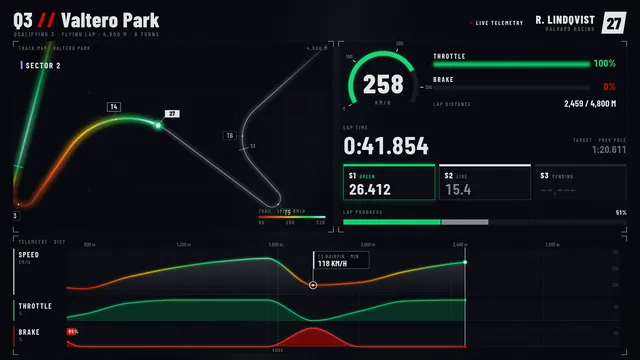 Rendered video
Claude Opus 5.5
Claude Code 2.1.280
skills on · Claude Code 2.1.280 + Remotion/HyperFrames skills
Rendered video from the run
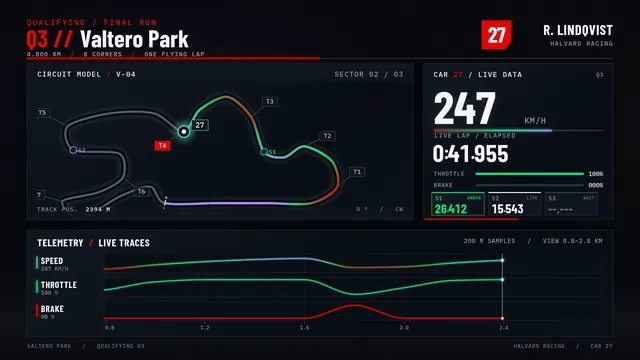 Rendered video
GPT-6 Sol
Codex CLI 0.156.1
skills on · Codex CLI 0.156.1 + Remotion/HyperFrames skills
Rendered video from the run